
Currently, there are many different economic calendars available, and it's up to you which one to use. These include: Investing, TradingEconomics, FXStreet, Myfxbook, Bloomberg, and others. However, our team finds the Forexfactory.com calendar most convenient, and using it as an example, we want to show you how to use it.
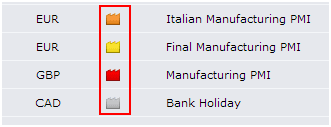
The currency market is influenced by many factors: politicians' speeches, news, economic reports, indices. News affects currencies, and they are categorized by the importance of events. News items are marked as: Orange — medium impact, Yellow — low or no impact, Red — potentially high impact, White — non-economic events (holidays, etc.).
Currently, some traders take high risks by trading precisely during news releases, while others try to avoid trading at such times. Therefore, it's important to know both the timing of news releases and their impact levels.
Setting Up the Calendar
First, we need to configure the clock settings so that news release times match our local timezone.

- Click on the clock icon at the top of the page: Then you'll see the DST ON/OFF setting for Daylight Saving Time.
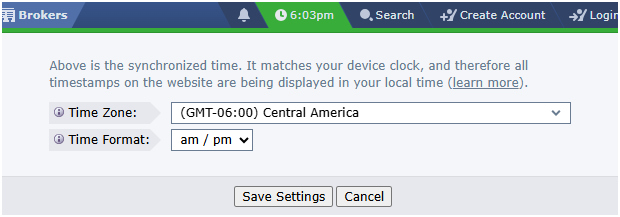
- Timezone — Select your preferred timezone.
- Time Format — Choose between 24-hour or 12-hour time display.
- Click Save Changes to apply your settings.
These settings are saved even without registration.
Calendar Structure
This calendar is easy to understand. The first column displays the day of the week and date. The second column shows the time of the news release. The third column indicates the currency affected by the news. The fourth column uses colored icons to show the impact level on the currency. The fifth contains a brief description of the news. The sixth provides detailed information — click the folder-like icon to view it. The next columns show news values: the seventh displays the Actual value (the figure contained in the news), the eighth shows the Forecast value, and the ninth shows the Previous value.
If a value appears in green, the news outcome was more favorable than forecast. If it appears in red, the result was worse than expected. Gray means the actual value matched the forecast. In the last column, you can view a chart of historical values over several years.
Additionally, two buttons appear above the calendar: "Up Next" jumps to the upcoming news event, and "Filter" lets you customize filtering by currency, impact level, and news type.
- Date — date
- Currency — currency
- Impact — impact level
- Detail — more about the news
- Actual — current value
- Forecast — forecasted value
- Previous — previous value
- Chart — historical values chart
How News Affects Currencies
Traders should know that news related to the USD affects not only the dollar itself, but all currencies, including gold. News about EUR affects only EUR pairs. There are many currency pairs, and each trader decides which ones to trade and which feel most understandable. However, here's one piece of advice: don't trade too many pairs at once. It's better to choose one or two pairs and study their movements thoroughly. Don't confuse yourself with multiple or different currency pairs — this way will be simpler and clearer. The choice is yours, but consider this advice.
It's better to avoid trading 30 minutes before and 30 minutes after major news releases. Don't try to guess the impact of news — it's nearly impossible for an ordinary person. Therefore, it's better to stay out of the market and wait until volatility settles down.