📲 Install MyTraderDiary as an app — faster, more convenient, works offline.
Useful materials from the MyTraderDiary team
Path to a Better Version of Yourself: A Complete Guide to Using the MyTraderDiary Platform
18 October 2026
We decided to create this article especially for you. It will show and explain what the MyTraderDiary website is for, how to use it, and why a trading journal is important for a trader. And we will explain why. Each of us has a desire to achieve something. But this project has its own motto, and we want you to join us with the same motto:
«I will become a billionaire»
Not for the money, but because I choose the path to a better self.
A better version of myself every day. After all, even if you don't become a billionaire, you will definitely become stronger, smarter, and more successful than you were yesterday. And that is already a real victory.
We hope this will become your motto too!
Everyone knows that for any business, for any endeavor, it is necessary to keep notes. To keep comments, to mark certain dates and events. And this is very important.
And no trader will succeed in forex if he does not do this simple work. A trader will not succeed if he looks for market entry signals from strangers, in some groups. This is bad, and it will teach you nothing. A trader MUST learn to understand the market, understand risks, understand and navigate the direction of price movement, and earn. Only in this way will he be able to see the market, read it, and understand the direction of movement. This is the same as in any other business. Keeping notes is essential.
Therefore, in this article we want to tell you how to use this resource. Everything will be clear and simple here, and we want to make it easier for you so that from the very first moments you start improving yourself, without being burdened by thoughts like «Am I doing it right?» and so on.
We have deliberately included screenshots in the article so that you understand where you are and why it is needed. Well then, let's begin:
1. Navigation and Main Menu
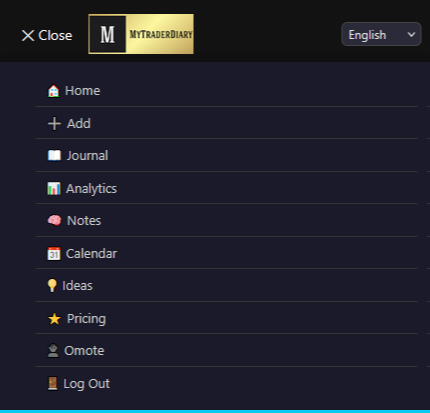
This is what the menu looks like in the desktop version.
Desktop menu
But depending on the screen width, the menu may turn into a mobile version.
Mobile menu
We strive to make it convenient for all screen sizes, so we think everyone will find a comfortable option.
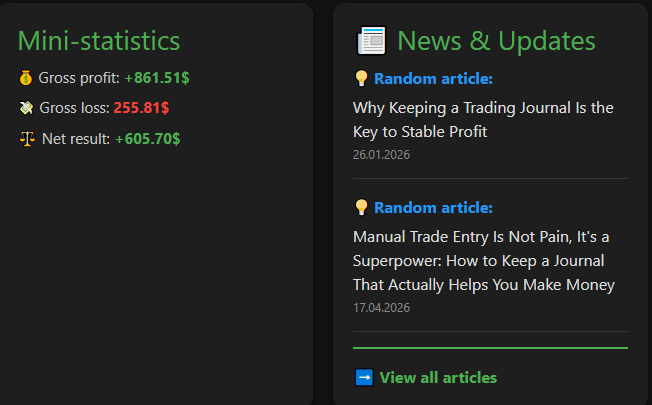
After registration or login, users will land on the main page of the site, which contains mini statistics — your trading results. Next are news and tips that we present to you. And in the future, there will be other elements.
Main page
2. Adding a Trade (Add Trade)
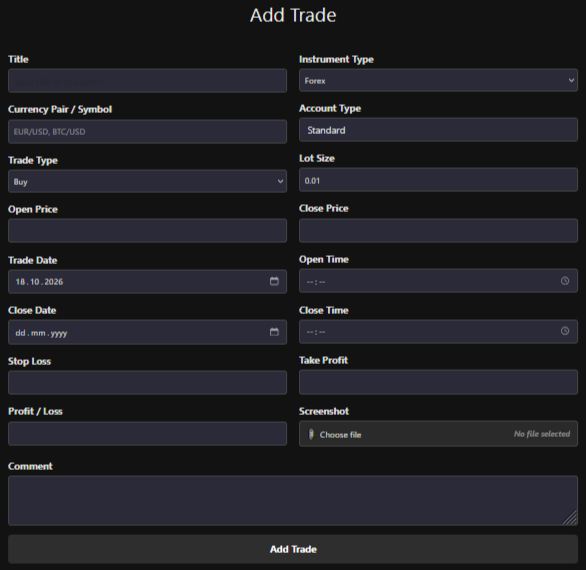
Gradually, we move on to the Add Trade page — this is the form for adding a trade to your trading journal. Filling in such data is important not just for keeping history, but for objective analysis of your trading.
Add Trade form
Why a trader should keep a trade journal
See real statistics: A journal helps you understand how many trades are actually profitable, which instruments and trading conditions give the best results, and where losses occur more often.
Find recurring mistakes: Records allow you to notice patterns: entries without a signal, exiting too early, violating the stop loss, excessive position size, or trading out of emotion.
Control risks: Fields for trade volume, entry price, Stop Loss, Take Profit, and Profit/Loss help evaluate the risk-to-reward ratio and check whether risk management rules were followed.
Analyze strategy effectiveness: Information about the instrument, trade type, and open/close times allows you to determine in which currency pairs, sessions, and market conditions the strategy works best.
Develop discipline: When a trader knows that every trade must be recorded in detail, he is more attentive to his decisions and less often enters the market impulsively.
Work on psychology: The «Comment» field helps you record the reason for entry, your emotional state, and your conclusion after the trade. Over time, it becomes clear which emotions most often lead to mistakes: fear, greed, the desire to win back losses, or haste.
Confirm your conclusions: A trade screenshot allows you to return to the chart and see what the market looked like at the moment of entry and exit. This is especially useful when reviewing both profitable and losing trades.
What is recorded in the form:
Title: the name or a brief description of the trade;
Instrument Type, Currency Pair / Symbol: the market and trading instrument;
Trade Type: buy or sell;
Account Type and Lot Size: account type and position volume;
Open Price and Close Price: opening and closing prices;
Trade Date, Open Time, Close Date, Close Time: dates and times of the trade;
Stop Loss and Take Profit: pre-set risk levels and targets;
Profit / Loss: the financial result;
Screenshot and Comment: confirmation of the chart situation, the reason for the trade, emotions, and final conclusions.
The main value of a journal is turning every trade into experience. Thanks to regular records, a trader makes decisions not based on memory and emotions, but relies on his own statistics and facts.
3. Trade Journal and Data Import
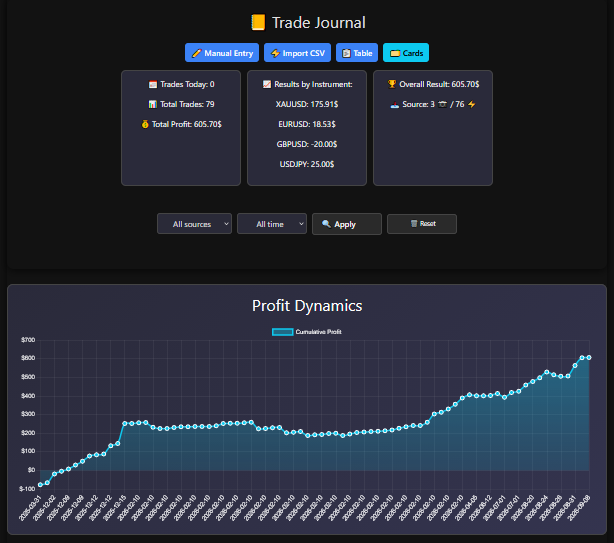
After entering your results, go to the Trade Journal page. There you will see your first chart, which shows your direction during trading days. For the chart to start showing your results, you must enter at least two trades. But for greater effectiveness, enter three trades, and the chart will show your results. Also, at the top of the page there are four buttons, the first of which takes you back to the manual entry page. Next is the page about importing your trading orders, which we will discuss a little later.
Profit dynamics in Trade Journal
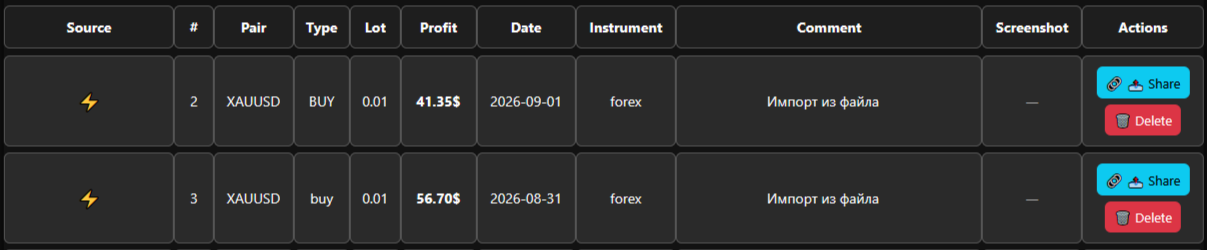
And here there are two types of display for your orders. One option is presented as a table, and the second option is presented as cards. We decided to make two options, and everyone will find the one that is convenient for them.
Table view
In either option, you can left-click, and a modal window with order details will open.
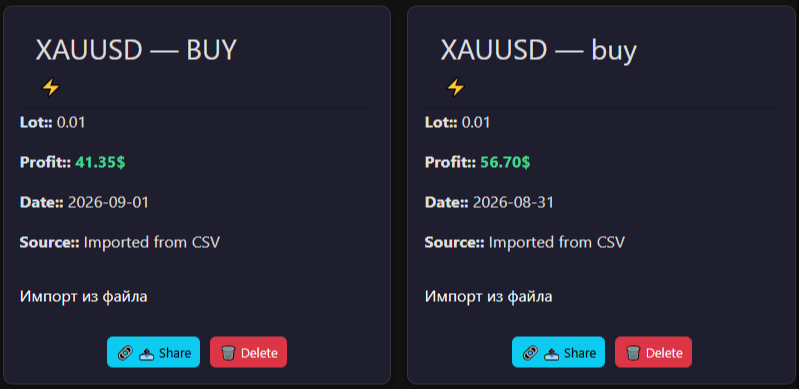
Below is the Card view option. Everyone can use both options or choose the one that is convenient. Choose.
In either option, you can left-click, and a modal window will open showing your executed order, which you can subsequently close or go to the editing or deletion window. We won't show you a screenshot of editing here, since it's simple and everyone understands how data editing is done.
Card view
And now, by clicking the Import CSV button, we go to a page where you can import your trading data not one order at a time, but as a list. Please read the description of how to import your trading results using an upload file. It is advisable to download this template from us, use it as a sample for data entry, retype your trading results into it, and import them. This way you can import your trading data faster and more comfortably if you have a lot of it.
4. Analytics
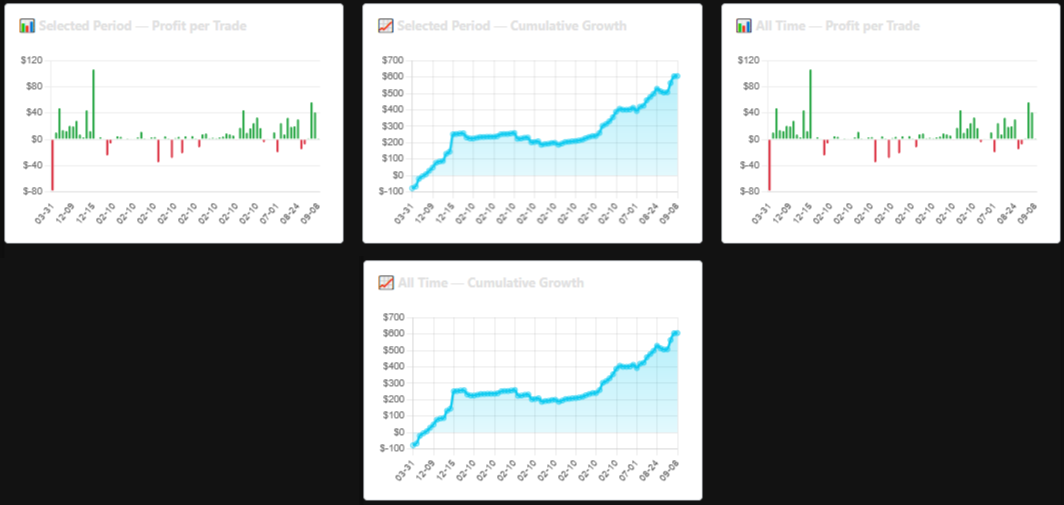
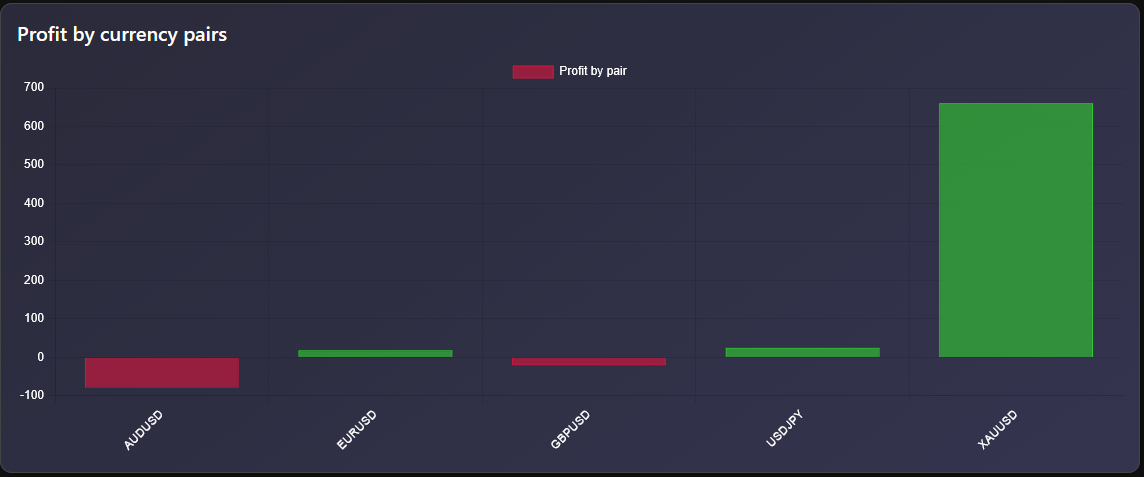
Now we have the Analytics page, which presents your statistics that you can view by periods. Charts are also presented there. So use it, observe your results.
CSV file import interface
CSV file import interface
Below the chart you can download a PDF report of your trading actions. Look, analyze, think about what can be improved, where you can improve your trading practice.
Here you can see total profit, Win Rate, and Profit Factor. Below the chart you can download a PDF report of your trading actions. Look, analyze, think about what can be improved, where you can improve your trading practice.
5. Mind Notes
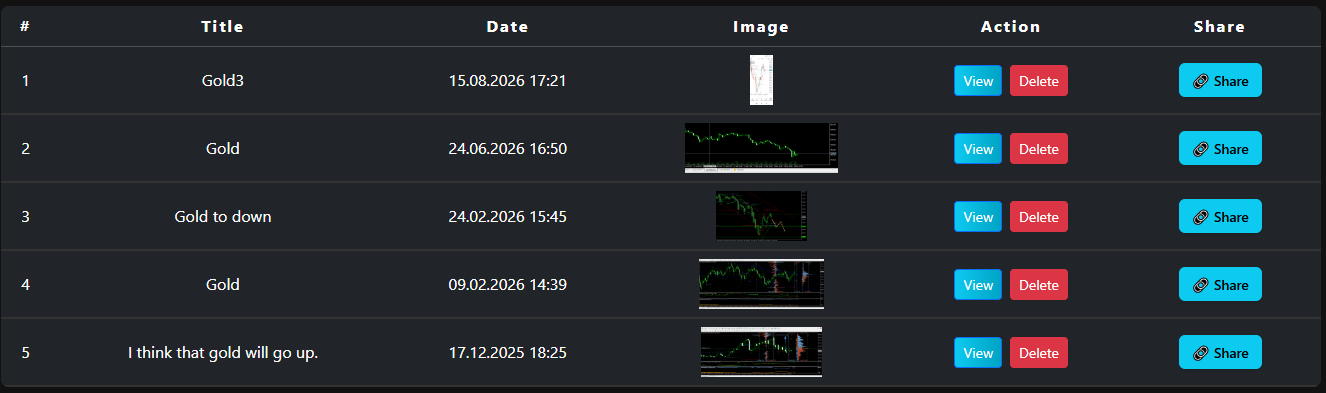
Now we move to the Mind Notes page, or simply Notes. Here you will find a list of thoughts, trading ideas, and hypotheses. Mind Notes is your intellectual hub for controlling emotions and capturing trading ideas. Since successful trading is not only about numbers, the Mind Notes module from MyTraderDiary was created specifically to help traders structure the chaos of thoughts, visualize analytics, and avoid emotional mistakes.
List of mind notes and ideas
Charts + Thoughts: Attach screenshots of trading setups directly to your notes.
Learning from mistakes: Analyze your hypotheses before opening a trade and evaluate their accuracy over time.
Instant sharing: Share your ideas and analyses with other traders via a direct link.
Easy on the eyes: A modern dark-mode interface designed for comfortable work in any lighting conditions.
6. Trader's Calendar and Withdrawal % Calculator
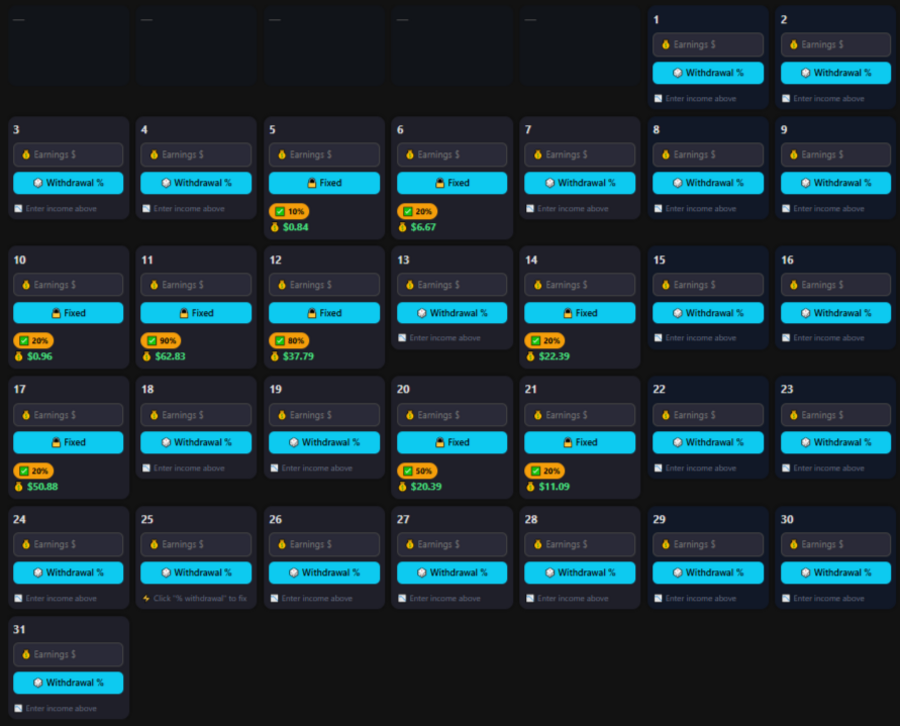
This is a professional functional module, a risk management and results tracking tool designed to protect real profits and prevent complete deposit loss.
Calendar with withdrawal percentage calculation
How the Withdrawal Calculator from MyTraderDiary helps:
Realizing profit: Money is considered earned only when it is withdrawn from the account. The calendar forces you to turn numbers on the screen into real money.
Disciplining element of gamification: A random algorithm (10%–100%) removes the psychological barrier of «how much exactly to withdraw today.» You don't have to make a painful decision — the system sets the rule for the day.
Reducing the risk of bankruptcy: If a losing streak occurs, your main capital remains protected because part of the profit was withdrawn in advance.
Psychological relief: Each fixed amount strengthens confidence in your trading system and gives a sense of psychological victory at the end of each trading day.
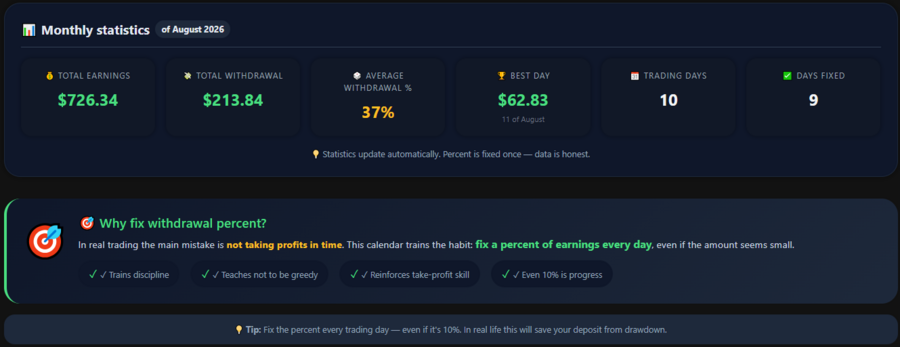
Monthly statistics under the calendar
Here, in essence, your trading month is described, and you see how well it has been worked out, and you can see how much money you transfer to your own account or wallet. Therefore, be sure to keep a calendar for your well-being.
At the beginning of this article, we told you about the motto — I will be a billionaire! Yes, the Ideas page begins with this motto. Why? Because in it we will talk about and share ideas and tips aimed at improving your idea, or, frankly speaking, your desire to become better. Read, think, analyze, apply what you consider necessary and important for yourself.
Monthly statistics under the calendar
7. Pricing and Subscription
The Pricing page is about purchasing a premium account. Why is a trader's journal an investment that pays off from the first trade? Every trader comes to the market with one goal — to earn. But why do 90% of beginners lose their deposit? The answer is simple: lack of discipline, emotions, and lack of quality analytics of their trades. Have you ever thought about how much at least one emotional mistake on Forex costs? One thoughtless entry, one «breakdown» without a stop loss — and the market takes $20, $50, and sometimes hundreds of dollars. The MyTraderDiary platform is designed to protect your capital and turn chaotic trading into a clear, profitable system.
☕ The price of discipline: A cup of coffee or protection of your deposit
The price of the paid plan is only $9 per month (or about $0.30 per day).
☕ A cup of coffee at a café: $3.00 - $4.00 (15 minutes of pleasure).
📊 A professional trader's journal for the whole day: $0.30 (protection from impulsive trades and deposit loss).
It turns out that full access to all analytical tools, unlimited notes, and charts costs 10 times less than one cup of coffee per day!
We are confident in the benefits of the service, so we give every registered user 7 days of full Premium access for free. You can choose:
2 weeks for just $5 — an ideal short-distance test drive.
30 days for $9 — a full month of working on discipline.
A discounted annual plan — for those aiming for serious professional results.
Remember: A successful trader saves not on analysis tools, but on prevented losses. Take a step towards conscious trading today!
8. User Profile
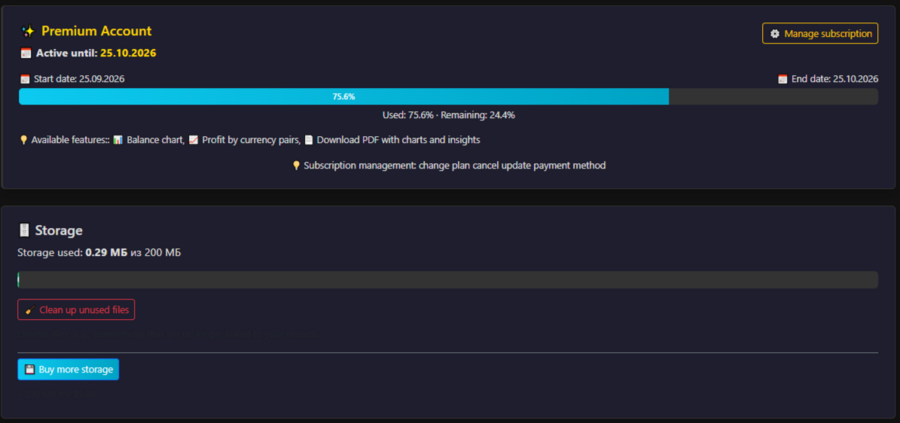
By clicking on your nickname, you go to your profile page. There you will see and can specify your place of residence. You will see the number of your trades, how many are profitable or losing. You can also download a PDF file of your trades here. This is for your reflection. Further, you will see information about your premium subscription and the space allocated for your journals and notes.
Profile page and storage
This concludes the description. Why this article? So that you don't wander around the site, but understand what a trader's journal is for. So use it and always become better today than you were yesterday!